Determine Relative Advantage
Abstract
This capstone project used Skype to address an interviewing problem in an inner city school with students who conducted interviews for Project Citizen (PC) portfolio. These interviews are part of the process where the students determine a public policy problem in their community, research the problem, develop a recommended approach, and then document their activities in a portfolio. The interviews are used as part of their research activities and then documented on the boards for the portfolio and in the documentation binder of research. Figure 1 illustrates how the interview documentation is used in the PC portfolio. Through the use of Skype, students were expected to obtain better interviews for their project and enhance their learning in civics, language arts, and technology.
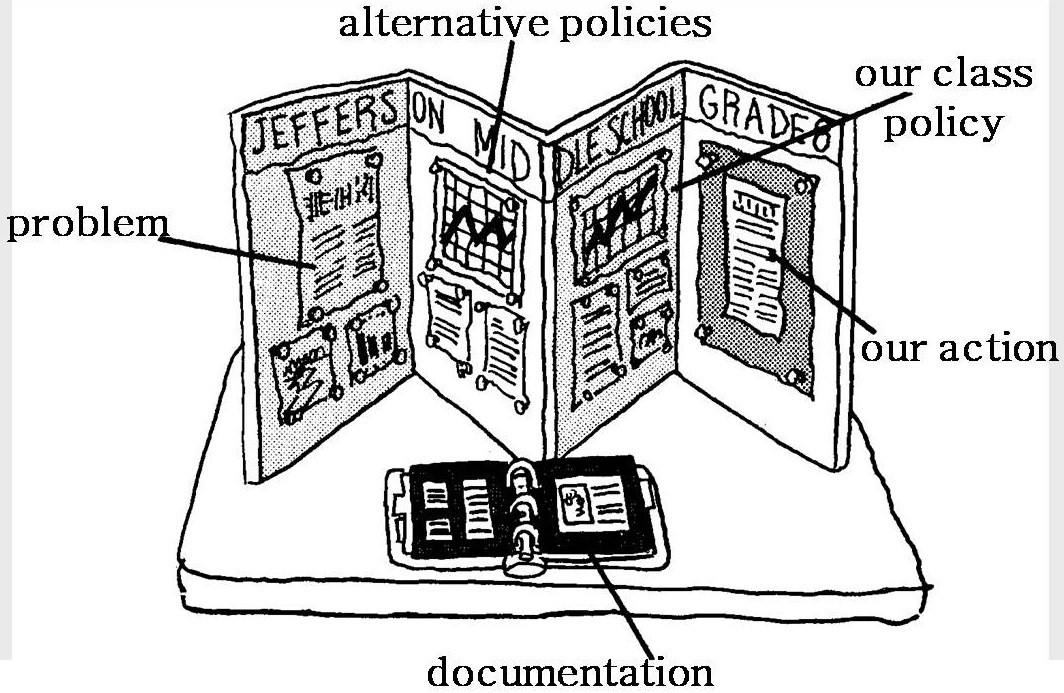
Figure 1. An example of a PC portfolio (courtesy of Center for Civic Education).
Project Citizen
The project was conducted using the civics education portfolio development activities associated with the Center for Civic Education, 5145 Douglas Fir Road, Calabasas, California 91302-1440, www.civiced.org. Project Citizen agreed in advance to work on this project. |  |
Schools Involved
This Capstone Project was conducted with two schools. The test school had the instructional technology implemented while the control school did not. The principals, teachers and PC mentor at both schools agreed to work on this project in advance.
The test school and the control school used the social studies teacher, technology teacher, and a PC Coordinator mentor teacher as the implementers. The students at the test school met for the Skype training and implementation of interviews once a week for one hour. Planning, training, and implementation for Skype interviews was conducted for the test school on ten days in October and November 2009. The control group received the same number of days of training based on the PC texts. The two projects were compared as to how many interviews were completed and the quality of the individual interviews. An interview was considered to be of sufficient quality if it was documented well enough to be included in the students' PC portfolio.
While the identities of the schools will remain hidden, the relevant information concerning the test school and the control school is contained in Table 1. Both schools are in the same inner city and follow No Child Left Behind, 21st Century Standards, Maryland social studies and technology standards, and the city’s curriculum standards.
Table 1
School comparison.
|
Topic |
Test School |
Control School |
|
School district |
City Public Schools |
City Public Schools |
|
Established |
2006 (6th only) |
2009 (Middle School) |
|
Grades served |
6th (2007), 7th (2008), 8th (2009) |
6th – 8th (2009) |
|
Status |
Operational |
Operational |
|
Full-time teachers |
25 |
29.5 |
|
Teachers involved in project |
1 social studies, 1 computer |
1 social studies, 1 computer |
|
Enrollment |
130 (2007), 390 (2009) |
361 (2007) (Elementary School) |
|
Students involved in project |
15 |
25 |
|
|
Student Demographics |
|
|
Gender |
Male only |
Co-educational |
|
Special education |
7.4% |
TBD |
|
Truancy |
0.0% |
0.55% |
|
Federally subsidized lunches |
72.7% |
60% |
|
African-American |
99.2% |
83.4% |
|
White |
0.8% |
11.1% |
|
Hispanic |
0.0% |
3.0% |
|
American Indian |
0.0% |
0.8% |
|
Asian/Pacific Islander |
0.0% |
1.7% |
|
Math proficiency |
50.9% |
77.9% |
|
Additional information |
Male only Emphasizes science, technology, engineering, and mathematics (STEM) Extended school days Required Saturday class Required summer school |
Coeducational Has a technology class
Regular school day No Saturday classes Summer school optional |
Data compiled from:
http://www.schooldigger.com (Source: National Center for Education Statistics, U.S. Dept of Education)
Discussion
Problems Conducting Interviews
PC is a program where students learn about civics through the creation of a portfolio that illustrates a public policy they have researched and are recommending an action plan to address. Interviews are required for students to produce the PC Portfolio (Center for Civic Education, 2006). Based on the author's experience as a Maryland PC District Coordinator, students throughout Maryland lack effective use of interviews. The interview quantity and quality has been low in PC showcases in Maryland since the year 2000. This has resulted in Maryland portfolios receiving lower evaluations by judges in the national showcases at the National Conferences of State Legislatures.
The Project Citizen: Level 1 text (Center for Civic Education, 2006, p. 8) gives a good guide for students to conduct interviews. If the students have interviews, the person interviewed is usually a relative or friend that may not be the most relevant to address a public policy issue. The family, friends, and neighbors can be used as good interviews for finding and defining a public policy. The most relevant interviews for research on the public policy are often overlooked. The overlooked interview types are those recommended on pages 13 and 14, which are with professors, scholars, lawyers, judges, community organizations, interest groups, legislatures, and administrative agencies. This more extensive interview documentation form is found on page 19 and 20 in the text. Project Citizen: Level 2 (Center for Civic Education, 2007) provides similar information for older students and adults.
This higher level interview is what is lacking in many portfolios. The cost for the class or even a small group to travel to interview professionals is prohibitive. It also takes too much of the teacher’s and students’ time away from the social studies class and could infringe on other classes during the working hours of the day of the professional. In some cases the only research the students are able to conduct are to review reports. Irrelevant or few interviews in the documentation section have been found in previous portfolios because of the difficulty of time in the working day. Current relevant primary-source interviews are what the portfolios should contain in their documentation sections.
Using Technology to Improve Interviews
Branzburg (2007), Eröz-Tuğa and Sadler (2009), Foote (2008), Godwin-Jones (2005), Pan and Sullivan(2005), and Schaffhauser (2008) discuss the merits of and safe approaches for using voice over Internet protocol (VoIP) for students to engage in conversations with others at a distance. The use of VoIP could help the students produce more interviews and increase the quality of interviews needed in a PC Portfolio. Different VoIP tools considered were CUworld, ICQ, MSN Messenger, Paltalk, Skype, and Yahoo Messenger. Exposing students to VoIP also increases their technology skills and teaches them to communicate in the 21st century, as noted by Foote (2008).
The test school that will be used in this study to improve the quantity and quality of interviews has participated in the showcase in 2009. The data collected will be compared to their last year’s showcase and then compared to a control school that will not have Skype available for interviews. Statistics of the number of interviews that can be collect from other years and other schools will be compared. The quality of the interviews will be evaluated through a detailed rubric addressing the quality of the professional and content of the interview.
Based on return on investment (ROI) including consideration of cost, time, transmission quality, software/hardware requirements, ease of installation and use, and available support, Skype (www.skype.com) was the chosen VoIP. |  |
The relative advantage of Skype is that it provides students an ability to conduct VoIP and video-teleconferences at almost negligible cost for schools that already have computers and robust Internet connections. The students need not leave the school and the professionals need not leave their offices. Many students can participate. Both interviewer and interviewee save time. Students get higher quality interviews.
Approach
The proposed solution was implemented by first introducing Skype to the school administration, then to the classroom teacher and technology teacher, then a small group of students and an entire portfolio group. The students found very qualified persons to interview, ones that would use Skype and some that could not.
Using VoIP as a technology for having students interview was compatible with the test school in some part because it is a Science, Technology, Engineering, and Mathematics (STEM) school. The teachers at that school have been encouraged to use technology in all of the content areas. Each classroom had a teacher’s computer and three Internet-accessible computers for the students to use with the teacher's permission and supervision. The computers to which the students normally have access had a firewall that prevented the use of Skype, although Skype “generally works well, even through firewalls” (Godwin-Jones, 2005). Because consultant’s laptops had earlier been approved for students to work on projects, external laptops were brought in for the students to use for their Skype sessions.
Community chat rooms were not allowed to be used in the school for safety reasons. Safety on the computer was of great importance to the school. The selection of a compatible VoIP application for the school was influenced by Table 2 of Eröz-Tuğa and Sadler’s (2009) analysis of six different possible VoIP approaches for language teachers. They compared CUworld, ICG, MSN Messenger, Paltalk, Skype, and Yahoo Messenger. Of that list, only two had the safety aspect of not allowing community/chat rooms. Those two were MSN Messenger and Skype, both of which have audio and video capabilities and reasonable requirements for hardware and software.

Figure 2. A screenshot of Skype (photo by author).
It was also important that the technology was easy to use, not too complex for the classroom teacher, the students, or even the technology teacher. Schaffhauser (2008) remarks, “School districts have by and large had great results implementing VoIP … delivering expanded functionality (and) achieving greater control.” In Table 4 of Eröz-Tuğa and Sadler (2009), they compare technology issues and user issues for the VoIP applications. Skype was rated first in “website user friendly,” one of the most important aspects to be considered since the students used the application. Skype also rated second in every other area: “easy to install, easy to setup, good help/support, easy to use, easy to add members, easy to start a conversation, (and) easy to see if others were online.” A screenshot of Skype in its simplicity is at Figure 2.
Additionally, Godwin- Jones (2005) notes that Skype “provides good quality (through highly efficient compression) and is free, it has become widely used” and, compared to voice chat programs, “the quality is generally better and software incompatibilities are less of an issue.” The Skype Video Options button allows the user to easily vary simple settings, including whether to automatically enable video on startup (Branzburg, 2007). Foote (2008, p. 43) provides the simple instructions to bring Skype to a school, including installing the software, getting a microphone and headphones, creating an account, inviting others to join the contact list, and making a call. A low-cost video camera was also needed. Before the installation, the school teacher and students agreed on the Skype name they would be using. The school administration also decided where to install the software (Foote, 2008). In this case they chose a laptop that was not owned by the school.
Because Skype is available at minimal additional cost to the school, it could be tried for only the cost of the time of the teachers who would install it and learn to use it. It is very user friendly and engaging (Branzburg, 2007), so as expected this time was brief. Skype is a technology that is equally of value to rich and poor schools, “a way of democratizing institutions” (Godwin-Jones, 2005). Using technology for this civics function also improved instruction in language arts (interviewing and documenting) and technology (a different use of the Internet). As Pan and Sullivan (2005) state, the students “discover a new tool that is suitable for a distributed learning environment.” Observing the use of Skype for PC allowed the school to determine if it might also be useful in other applications.
The use of a communications protocol in a school requires strong consideration for the safety of students. The school must ensure the students do not use the application inappropriately and are not exposed to inappropriate material. To address security concerns, Foote (2008) recommends restricted access to the stations with Skype installed and the use of a student designated to be the interface with Skype. The whole class could see the interaction using a laptop projector, but the actual interface would be conducted by a single person. Teaching our students good practices in using the Internet is one of our responsibilities (Foote, 2008).
Skype engaged the students and addresses several of the aspects of motivating students, making students work more productively, enhancing instruction, and helped students learn and sharpen their information age skills outlined by Roblyer and Doering (2010, p. 14-16). This use of Skype gained the students’ attention, illustrated real-world relevance, connected them with audiences, engaged them in real-world situations and collaboration, supplied immediate feedback, let them study in unique ways, gave access to unique information, allowed access to learning opportunities, supported cooperative learning, provided fast access to information sources, saved money, and improved technology literacy. Additionally, use of Skype in this manner addressed all four technology integration strategies that support both the directed teaching and the constructivist models in Roblyer and Doering (2010, p. 48), “To generate motivation to learn,” “To optimize scarce personnel and materials resources,” “To remove logistical hurdles to learning,” and “To develop information literacy/visual literacy skills.”
Summary
This capstone project used Skype to address the difficulty inner city school students have with conducting meaningful and impactful interviews in the development of a PC portfolio. The use of Skype addressed the difficulties associated with cost, time, and accessibility for their interviews. Through the use of Skype, students obtained better interviews for their project and enhanced their learning in civics, language arts, and technology.
References
Branzburg, J. (2007, March). Talk is cheap: Skype can make VOIP a very real communication option for your school. Technology & Learning, 27(8), 36. Retrieved September 27, 2009, from Galenet Biography Resource Center.
Center for Civic Education. (2006). Project citizen: Level 1. Denver, Colorado: Author.
Center for Civic Education. (2007). Project citizen: Level 2. Denver, Colorado: Author.
Eröz-Tuğa, B., & Sadler, R. (2009, November). Comparing six video chat tools: A critical evaluation by language teachers. Computers & Education, 53(3), 787-798. Retrieved September 27, 2009, from Science Direct.
Foote, C. (2008, January). See me, hear me. School Library Journal, 42-43. Retrieved September 27, 2009, from ERIC.
Goodwin-Jones, R. (2005, September). Skype and podcasting: Disruptive technologies for language learning. Language Learning & Technology, 9(3), 9-12. Retrieved September 27, 2009, from llt.msu.edu.
Pan, C., & Sullivan, M. (2005, September). Promoting synchronous interaction in an elearning environment. T.H.E. Journal, 33(2), 27-30. Retrieved September 27, 2009, from EBSCOhost.
Roblyer, M. D., & Doering, A. H. (2010). Integrating educational technology into teaching (5th ed.). Boston: Allyn & Bacon.
Schaffhauser, D. (2008, November). Is VoIP worth it? T. H. E. Journal, 35(11), 26-31. Retrieved September 27, 2009, from EBSCOhost.

Webmaster: Gayle Dietrich, gayledietrich@comcast.net.
Last modified November 29, 2009.
