Prepare the Environment
Abstract
This capstone project used Skype to address an interviewing problem in an inner city school with students conducting interviews for a Project Citizen (PC) portfolio. These interviews are conducted during the process where the students determine a public policy problem in their community, research the problem, develop a recommended approach, and then document their activities in a portfolio. The interviews are used as part of their research activities and then documented on the boards for the portfolio and in the documentation binder of research. Skype was used at an all-male Science, Technology, Engineering, and Mathematics (STEM) charter middle school in the inner city, a school that calls its students “scholars.” Only face to face interview training was provided to the control middle school, a co-educational public school in the same inner city. Both schools contained predominantly minority students. Figure 1 illustrates the type of computer that was used. Through the use of Skype, students were expected to obtain better interviews for their project and enhance their learning in civics, language arts, art, and technology.
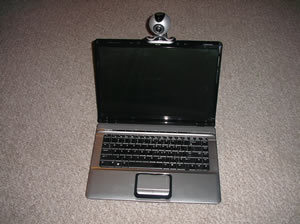
Figure 1. The computer used for Skyping had an internal microphone and installed speakers but required an external video camera. External speakers were also used to provide greater volume so that all the scholars could hear.
Background
The school where this project was implemented is an all-male STEM charter school. Research has noted that boys tend to play more online games, participate in video Web sites, and are more likely to use online learning (Dowell, Burgess, & Cavanaugh, 2009). The scholars in this school are no exception to that research. An example of this desire to demonstrate and expand their skills is that one of the scholars brought his MP3 recorder and recorded the lesson to take notes later. When the student asked for permission to record the session with his MP3 recorder, the teacher was very comfortable to have his lesson and discussion recorded. This certainly is an indication of how the scholar felt comfortable with this recorder and had the manners to ask if it was all right for him to record. The teacher’s prompt and comfortable response indicates the school’s support to the cutting edge technology.
Most students use the Internet in a positive way (Dowell, Burgess, & Cavanaugh, 2009). The scholars at this school are much the same, but the teacher still must be careful in introducing Skype and providing the scholars greater access to the Internet. Some students may abuse the privilege and attempt to access inappropriate web sites through overriding or manipulating the filters and blocks (Dowell, Burgess, & Cavanaugh, 2009). The use of two teachers and the projecting of the screen image for all to see are both effective methods to monitor the scholars’ web access.
PC was introduced to the school the previous year (2008-2009). Many of the scholars who developed that portfolio were also involved in producing the 2009-2010 portfolio, the one for which this project applies. In their previous portfolio, they had no meaningful interviews for the documentation folder and the portfolio boards. Despite that deficiency, their portfolio received second place in the state showcase. They required a way to obtain more and more meaningful interviews.
Telephone interviews were a possibility. However, “face-to-face communication is perhaps the most intuitive, robust, and effective forms of communication between humans imaginable” (Edlund & Beskow, 2009, p. 351). Computer-to-computer images allow a face-to-face interaction without the out-of-class times and expense of transportation from the school.
Face-to-face interviews when the speakers are remote from one another, for example in different countries, once was a complicated process involving significant travel. Bridging that gap with technology was only an idea in some people’s minds. “A number of years ago, the expectations subjects had of talking computers were often shaped by the computers in science-fiction” (Edlund & Beskow, 2009, p. 352). Now that dream is reality. Voice over Internet Protocol (VoIP) and Skype are widely accepted and used; many people who have not yet experienced Skyping are anxious to do so.
This STEM school was already wired for Internet with potential for adaptation of the firewalls to safely support the use of Skype with the scholars. The staff was aware of the use of Skype. As noted by Roblyer and Doering (2010), it is important for the teachers to be familiar with the hardware and software to be used. In this STEM school the teachers and staff were savvy to modern technology and the associated safety precautions for students. However, for the schools where that may not be the case, training time for students also can serve as training time and experience for some teachers.
Resources
For this project, the author needed two computers that have the capability of connecting to the Internet and downloading Skype. Additional computers, in groups of two, would have been useful to allow active learning for more students and potentially more than two Skype interviews at a time. The computers needed microphones and video cameras either already installed or as add-ons. Although not part of this effort, computers without Skype could also have been used to take notes, conduct research on the Internet, or send emails to arrange the Skype interviews. These resources were needed two days a week for two hours each day for about four weeks to prepare the scholars for their interviews and then as needed to conduct the Skype interviews.
Figure 2 shows the video camera that was used and a microphone that could have been used if needed. For the first implementation of this project, the computer had a pre-installed microphone, but the camera in Figure 2 was plugged in to the USB port. External speakers were used to provide sound at a level easily understood by the entire class.
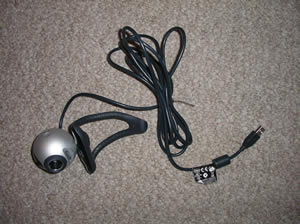 | 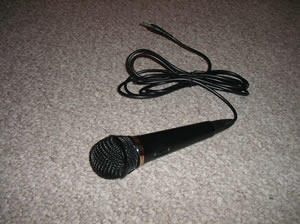 |
Figure 2. Examples of microphone and video camera that could be used as add-ons.
While the author used laptop computers, netbooks could also be good choices for using Skype to interview. They are economical and most come with microphones and video cameras pre-installed. At the STEM school, a guest teacher from another school became interested in using Skype to conduct interviews. He demonstrated his netbook to the scholars and then Skyped with them. His netbook is shown at Figure 3.
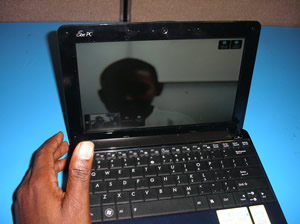
Figure 3. Skyping using a netbook. Skype interviews can be conducted on desktops, laptops, or netbooks.
A laptop projector was used to ensure all the class stayed involved as the students were Skyping. Peripherals such as power strips and extension cords were needed to provide power to the laptops and the projector because of the configuration of the room. Headphones, such as those in Figure 4, were not needed for this instance of the project, but could be used to assist students with hearing disabilities or who are easily distracted, or simply to lessen the impact of background noise. A printer and copier, with associated toner and paper, were used for printing and reproducing the results of research, handouts, and notes from interviews. A white board, blackboard, and/or easel paper can be used as a way for other students to convey information or additional questions to the student conducting the interview. The scholar at the STEM school who was using the white board while interviews were being conducted called himself "the teleprompter."
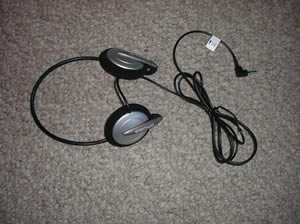
Figure 4. Example of headphones that could be used for Skype interviews.
For this implementation of the project, the school’s computer hardware was not available because the firewall, run by the city Department of Education, would not allow the download of Skype. Two laptops with Skype already installed were provided by the PC Coordinator. This was the technology backup plan; it needed to be implemented. A second backup, in the event technology is temporarily unavailable, is to have printed copies of the handouts available. A curriculum-based lesson that includes discussion of interviews, good interview questions, and preparation for interviews can be taught using only the handouts at appendices A through F. These handouts, developed specifically for this project, include pre and post surveys, procedure to access Skype, guidance to interviewing, and evaluation of participation in the project. If technology fails late in the effort, a backup lesson can be to proofread and revise interview documentation.
This project requires the purchase of no specialized software. It uses the drivers for the camera and microphone, the operating system for the computer, browser, email, and Skype, which is readily downloadable for free. Connection to the Internet is vital for this project. The Internet is used to download Skype, for the students to conduct research, to email to organize Skype dates, and to connect for the Skype interviews themselves.
During their practice sessions, the scholars realized that the background behind the Skyper could be distracting. Additionally, Marcelo (2009) emphasizes how the background behind the main image creates the environment and conveys information in many ways, telling information about the Skyper including indications of their personality. It provides “good conceptualization and visualization” (p. S2/7) to the person being interviewed. Therefore, the scholars chose as the background a small United States flag with the school logo and the Project Citizen logo. Scholars will also wear nametags with large print to enable the interviewer to identify them. Only the first name will be on the nametag for security purposes.
Logistics
In the first pre-visit, the room assigned for use was determined to be not acceptable because it did not have access to the Internet. The school’s room coordinator quickly readjusted the room assignment to allow Internet access. Two rooms were provided so students could Skype with peers and teachers during familiarization with Skype.
During both pre-visits, the PC Coordinator set up both computers and verified they would Skype with one another. For each session with the scholars, the PC Coordinator arrived at least one half hour early to set up the equipment and once more verify its normal operation. The scholars themselves verified the proper operation of the computers that were used for Internet research and note-taking.
Before the scholars were allowed to go online, they were prepared for using the Internet, Skyping, and interviewing. They were reminded of the school’s policies on Internet use, noting that two teachers will be observing, that the computer retains a history of websites visited, and that the actual interview will be projected on the screen for all to see. The Project Citizen Skype Interview Script handout (appendix D) was provided and the scholars were given tips on effective teleconferencing, including introductions at both ends of the teleconference, speaking clearly, and inviting input (Briefings Media Group, 2009).
The school has in place access arrangements for students with disabilities. None of the scholars in this project had special needs, but if a student has a hearing impairment, the image of the interviewee that Skype provides would show gestures and could allow the use of sign language or lip reading; additionally, the teacher could arrange for special earphones. Students with visual impairments could be positioned to better view the projected image. The projection of the Skype interview also can provide interesting and different stimulus that addresses some types of attention deficit issues. Students who may not be able to interview while the image of their face is onscreen, for example due to extreme shyness or attention deficit, could use an avatar to represent themselves (Edlund & Beskow, 2009). While no scholars chose this method, it could be an alternative that is more representative of face-to-face communications than would be a telephone interview.
As described by Edlund and Beskow (2009), two separate rooms were used for the scholars to practice VoIP communications with each other using Skype. By using separate rooms, the experiences of the students were limited to the cues they received over Skype; it was more like the actual interview would be. The scholars developed familiarity with initiating Skype and with the sound and video quality they experienced during the actual interview. Having the two computers in different rooms also avoided the audio feedback that would likely have been experienced if the computers had been too close to one another. Figure 5 shows the scholars Skyping each other to gain familiarity.
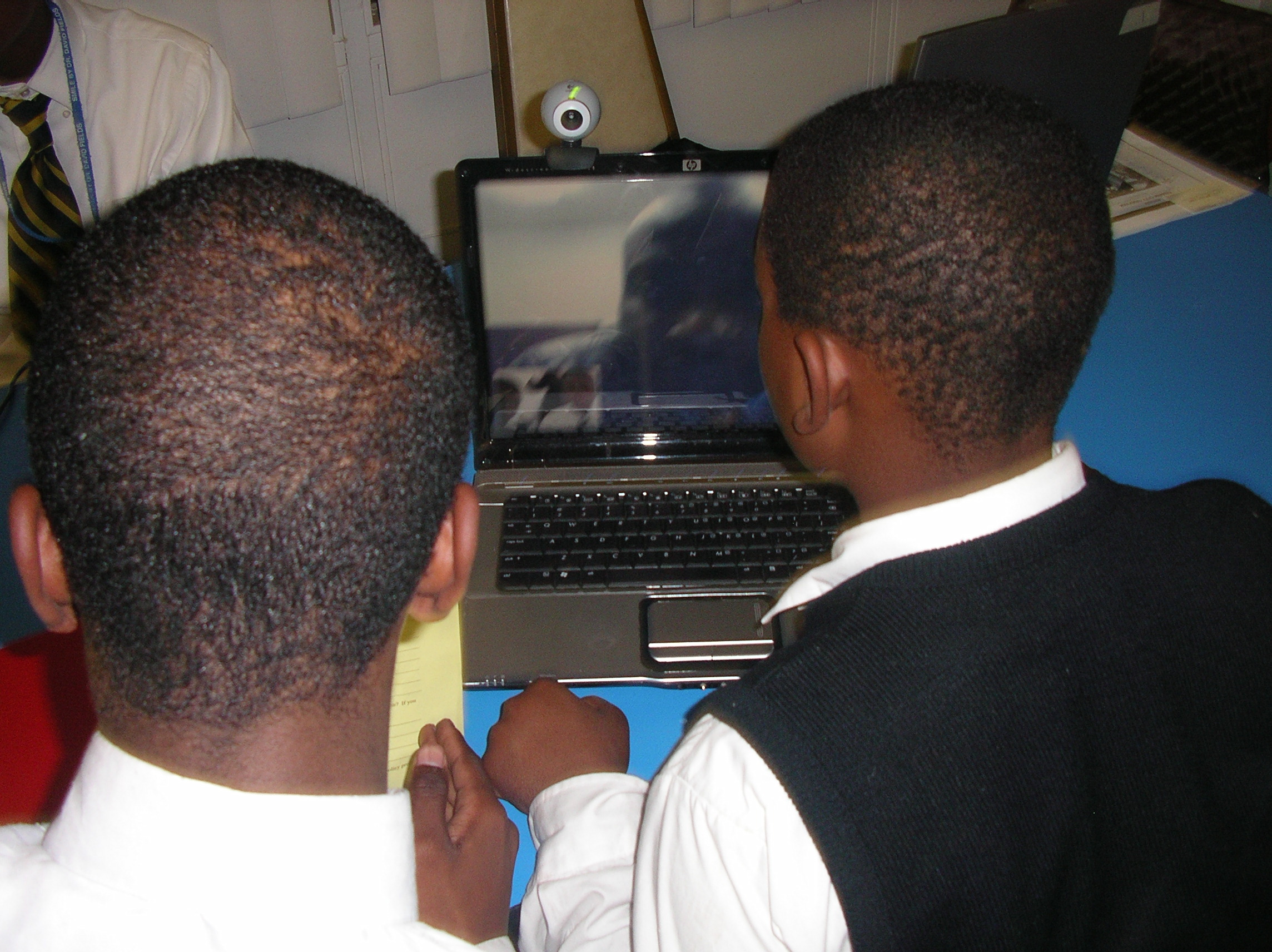
Figure 5. Scholars gaining familiarity by Skyping with peers.
After the scholars gained familiarity with Skype and the process of interviewing, and gained the confidence they needed to get rid of the giggles, they conducted practice Skype interviews with a teacher in the other room.
While the scholars were encouraged to set up the interviews, they did not have the skill sets to arrange them on their own. The teacher and the PC Coordinator needed to arrange the first professional interviews by calling the offices of relevant policymakers. Several responded enthusiastically and a few were excited about learning about Skype themselves.
The scholars prepared for the interview using the handout Project Citizen Skype Interview Script handout (appendix D). They developed questions and an organization for the interview, including prompts to conduct a courteous and professional interview.
Three scholars participated in each interview, with teacher supervision. All three were familiar with the research notes on the issue and the Project Citizen Skype Interview Script handout (appendix D) developed for the interview. One scholar was the interviewer and visible to the interviewee. Another took notes. The third actively listened and provided comments, suggestions, and facts to prompt the interviewer, often through the use of a white board. As one of the scholars noted, he was the “teleprompter.” The monitor image was displayed through the laptop projector and the sound was amplified through speakers so the class remained engaged by taking notes to provide input to the final write-up of the interview.
Figure 6 shows one scholar conducting the interview and another taking notes while a third scholar and a teacher look on. This photo clearly shows the laptop computer, the video camera, and the laptop projector used to facilitate engagement of the rest of the class.
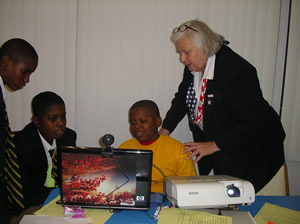
Figure 6. Scholars conducting an interview using technology resources, including a laptop projector to ensure full class participation. Throughout the project, students were supervised by teachers while accessing the Internet.
Summary
In this project, Skype was used as a tool to enable scholars to obtain more and higher quality interviews for their PC portfolio. Few resources were required other than those already available at most schools. Although the school’s firewall was problematic, the problem was overcome through coordination with the school’s staff. The teachers at this school were sufficiently Internet-savvy to readily implement this project. Teachers at other schools who are not as comfortable with technology could quickly learn this easy use of a VoIP. The scholars at this STEM school readily adapted to the use of technology to support the curriculum and were enthusiastic in its implementation.
References
Briefings Media Group. (2009, November). Teleconference tips. Communication Briefings. Retrieved November 3, 2009, from EBSCOhost.
Dowell, E. B., Burgess, A. W., & Cavanaugh, D. J. (2009, November). Clustering of internet risk behaviors in a middle school student population. Journal of School Health, 79(11), 547-553. Retrieved November 3, 2009 from EBSCOhost.
Edlund, J., & Beskow, J. (2009, June). MushyPeek: A framework for online investigation of audiovisual dialogue phenomena. Language & Speech. 52(2/3), 351-367. Retrieved November 3, 2009, from EBSCOhost.
Marcelo, S. L. (2009, May 26). Emerging from the background. BusinessWorld. Retrieved November 3, 2009, from LexisNexis Academic.
Roblyer, M. D., & Doering, A. H. (2010). Integrating educational technology into teaching (5th ed.). Boston: Allyn & Bacon.

|
Appendix A - Handout-Pre Project Citizen Interview Survey.docx Size : 0.015 Kb Type : docx |
|
|
Appendix B - Handout-Post Project Citizen Interview Survey.docx Size : 0.015 Kb Type : docx |
|
|
Appendix C - Handout-Skype Interview Planning Checklist.docx Size : 0.012 Kb Type : docx |
|
|
Appendix D - Handout-Project Citizen Skype Interview Script.docx Size : 0.012 Kb Type : docx |
|
|
Appendix E - Handout-Skype voice over Internet protocol connecting checklist.docx Size : 0.012 Kb Type : docx |
|
|
Appendix F - Handout-Student Productivity.docx Size : 0.013 Kb Type : docx |

Webmaster: Gayle Dietrich, gayledietrich@comcast.net.
Last modified November 29, 2009.
