Evaluate and Revise
Abstract
This capstone project used Skype to address an interviewing problem in an inner city school with students who conducted interviews for a Project Citizen (PC) portfolio. These interviews were part of the process where the students determined a public policy problem in their community, researched the problem, developed a recommended approach, and then documented their activities in a portfolio. The interviews were used as part of their research activities and then documented on the boards for the portfolio and in the documentation binder of research. Figure 1 illustrates how the interview documentation was used in the PC portfolio. Based on both anecdotal and numerical information, the use of Skype allowed students to obtain better interviews for their project and enhanced their learning in civics, language arts, and technology.
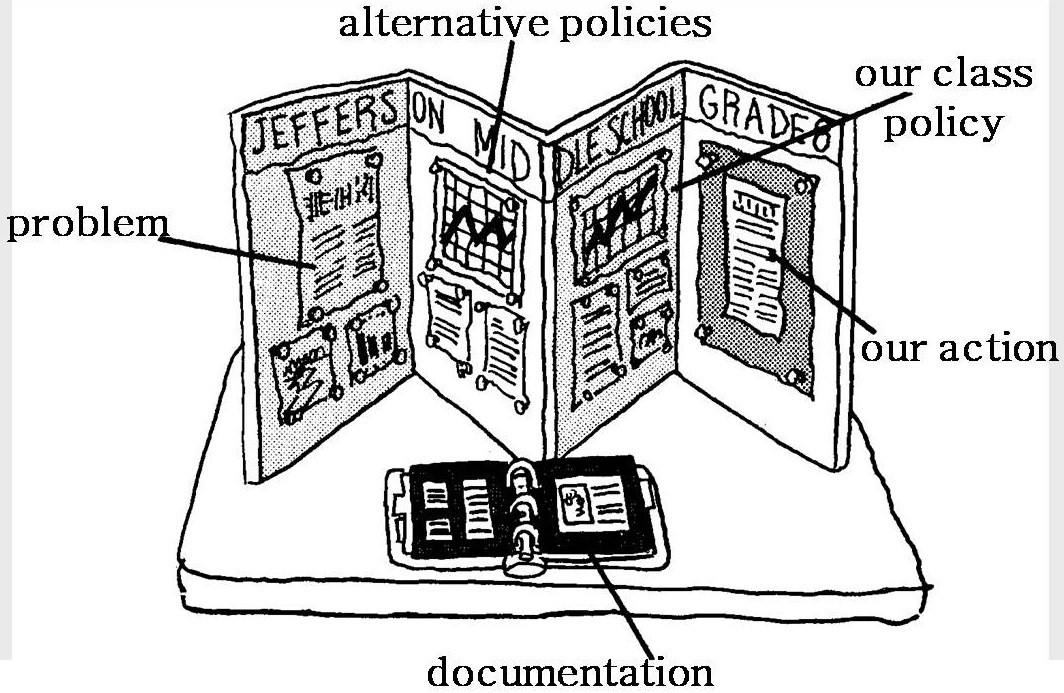
Figure 1. An example of a PC portfolio (courtesy of Center for Civic Education).
Objectives
The objectives of this project, as discussed in phase 2 and listed in table 1, were accomplished.
Table 1
Outcomes, Objectives, and Assessment Measures
|
Outcomes |
Objectives |
Assessment Measures |
|
Knowledge about and good attitude toward learning skills on interviewing. |
Students will demonstrate at least 85% required knowledge about interviewing by performing a class interview with an adult in the classroom and on Skype that demonstrates a synthesis of knowledge on interviews.
|
Pre and Post Project Citizen Interview Survey, Skype Interview Planning Checklist |
|
Greater knowledge about interviewing. |
Students will demonstrate at least 85% proficiency conducting interviews. |
Skype Interview Planning Checklist, Project Citizen Skype Script, and Student Productivity Skype Skill Evaluation |
|
Good attitudes toward using technology to communicate. |
Students will achieve at least 85% to demonstrate familiarity and comfort with Voice Over Internet Protocol (VoIP) by using Skype to conduct interviews and by evaluating others. |
Skype VoIP Connecting Checklist and Student Productivity Skype Skill Evaluation
|
Data and Interpretation
Some of the questions in the survey instruments used in this project used Likert scale statements to allow collection of data on the scholars’ self assessment of their computer communication skills and interviewing background. The potential responses to the Likert statements were 5 (strongly agree), 4 (agree), 3 (no opinion or unknown), 2 (disagree), and 1 (strongly disagree). Other questions were yes/no and factual to provide additional information on their computer experience and knowledge. Short essays were used to obtain anecdotal information in these same areas. Data was obtained using the handouts at appendices A through F. As shown in figure 2, scholars independently filled out the forms.
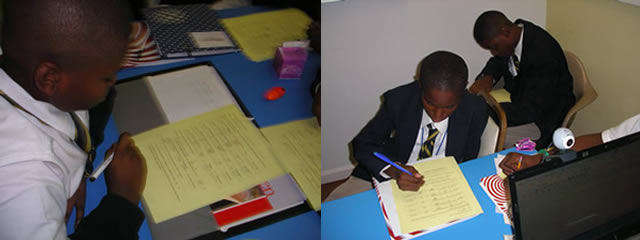
Figure 2. Scholars are filling out Pre-Surveys in the first class and Post-Surveys during the last session (photos by author).
The STEM scholars demonstrated their knowledge about and good attitude toward learning skills on interviewing. The teacher and PC Coordinator worked with each scholar until he achieved 100% on the Skype Interview Planning Checklist (appendix C). Additionally, the scholars learned to enjoy interviewing, as demonstrated by their responses to item 5 in the Pre- and Post- Project Citizen Interview Surveys (appendices A and B), “I like interviewing people.” The average response in the pre-survey was 3.8, while in the post-survey it was 4.5, an increase of 18%. The distribution of responses to item 5 in both surveys is in figure 3.
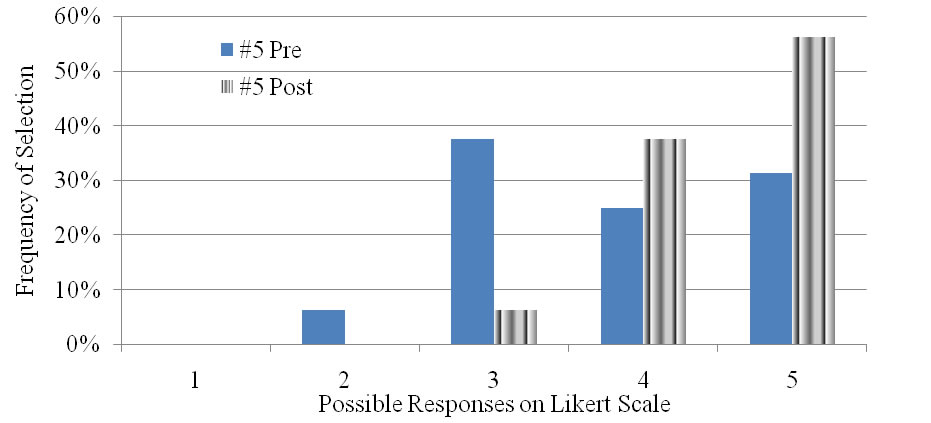
Figure 3. Distribution of responses to item 5, I like interviewing people, showing the increase at the STEM school following the Skype interviewing experience.
Anecdotal information also supports the scholars’ increased comfort with interviewing. Appendix G lists the responses scholars made to item 10 on the pre- and post-survey instruments (appendices A and B), “On the back of this paper in your own words describe your experience using Skype as an interview tool.” Of the 16 scholars, 14 wrote the word interview in a positive context in their answer, 1 scholar implied a positive perspective on interviews by stating “learn from people,” and only one had no mention of interview.
The STEM scholars demonstrated a much greater interest in interviewing people than did the students at the control school, as shown in figure 4. At the control school, the average response to item 5 was 3.16, very close to “no opinion or unknown.” However, after the scholars at the STEM school did their Skype interviews, their average response to that item was 4.5, solidly between 4 (agree) and 5 (strongly agree).
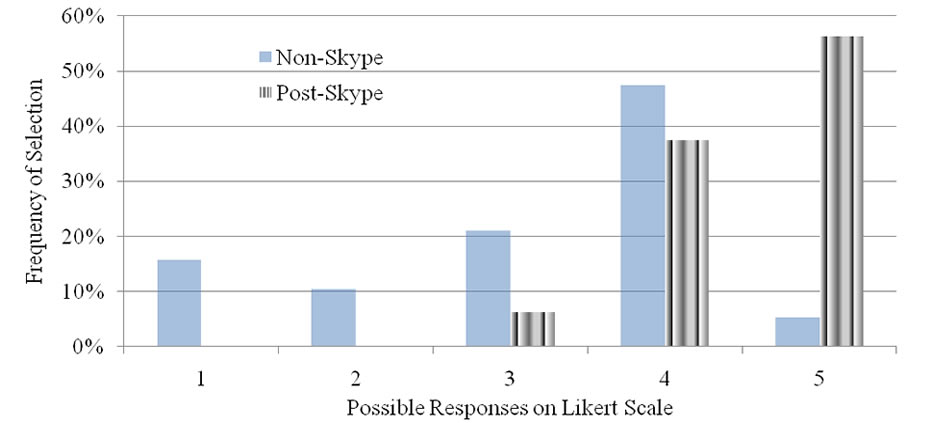
Figure 4. Distribution of responses to item 5, I like interviewing people, showing the difference between the non-Skype control school students and the scholars from the STEM school after their Skype interview experience.
The scholars demonstrated better knowledge about interviewing. In the pre-survey, only 9 of 16 scholars circled “yes” to the question, “Have you been taught how to perform an interview?” In the post-survey, 15 of 16 scholars circled “yes.” The teacher and PC Coordinator evaluated each scholar using the Skype Interview Planning Checklist (appendix C) and the Project Citizen Skype Script (appendix D) and, as shown in figure 5 worked with the students until they had achieved mastery of the topic so they could independently plan and conduct interviews.
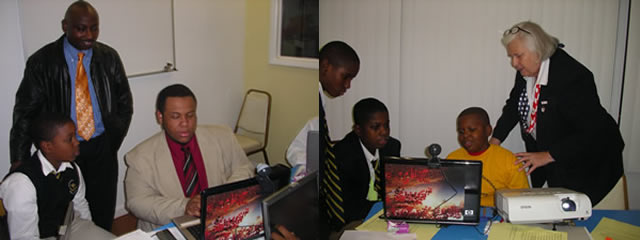
Figure 5. Teachers demonstrating the checklist and ensuring full comprehension (photos by scholar and author).
Every scholar was evaluated by the teacher using the Student Productivity of Project Citizen Skype Interview Skills Evaluation (appendix F). The results are tabulated in table 2 and displayed in figure 6. The average score was 93.4%, with only one scholar achieving the low score of 85% and many students achieving 100%.
Table 2
Student Productivity of Project Citizen Skype Interview Skills Evaluation
|
Scholar |
Works well with others |
Is responsible on computer |
Uses Skype to get interviews |
Is productive on interviews |
Produces quality work |
SUM |
|
A |
20 |
20 |
20 |
20 |
20 |
100 |
|
B |
20 |
20 |
15 |
20 |
15 |
90 |
|
C |
20 |
20 |
20 |
20 |
20 |
100 |
|
D |
Scholar withdrawn |
|||||
|
E |
20 |
20 |
15 |
20 |
15 |
90 |
|
F |
20 |
20 |
15 |
20 |
15 |
90 |
|
G |
20 |
20 |
20 |
20 |
20 |
100 |
|
H |
20 |
20 |
15 |
20 |
15 |
90 |
|
I |
20 |
20 |
20 |
20 |
20 |
100 |
|
J |
20 |
20 |
20 |
20 |
20 |
100 |
|
K |
20 |
20 |
15 |
20 |
15 |
90 |
|
L |
20 |
20 |
15 |
20 |
15 |
90 |
|
M |
20 |
20 |
15 |
20 |
15 |
90 |
|
N |
20 |
20 |
15 |
20 |
15 |
90 |
|
O |
15 |
20 |
15 |
20 |
15 |
85 |
|
P |
20 |
20 |
20 |
20 |
20 |
100 |
|
Q |
20 |
20 |
15 |
20 |
15 |
90 |
|
Average |
93.4 |
|||||
|
Minimum |
85 |
|||||
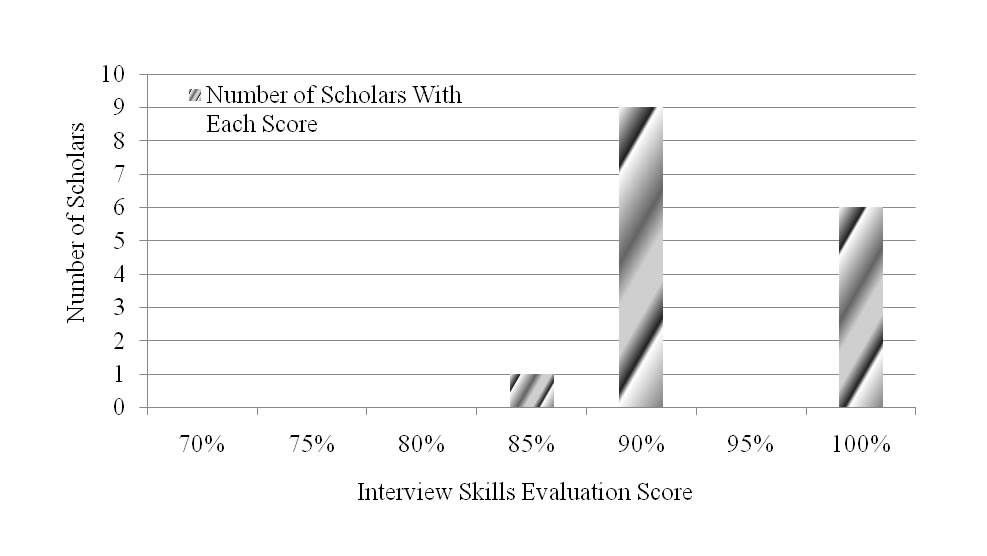
Figure 6. Numerical distribution of percentages for STEM scholars’ skills evaluation, showing their mastery of interviewing skills as measured by the Student Productivity of Project Citizen Skype Interview Skills Evaluation (appendix F).
The scholars demonstrated their good attitude toward using technology to communicate initially through their enthusiasm when they were told they would be Skyping. Additionally, in both the Pre- and Post- Project Citizen Interview Surveys (appendices A and B) the students responded enthusiastically to items 1 and 2, “I use the computer to communicate with others” and “I use email to communicate with others.” The responses are shown in figures 7 and 8, with averages between “4: agree” and “5: strongly agree” in the Likert Scale.
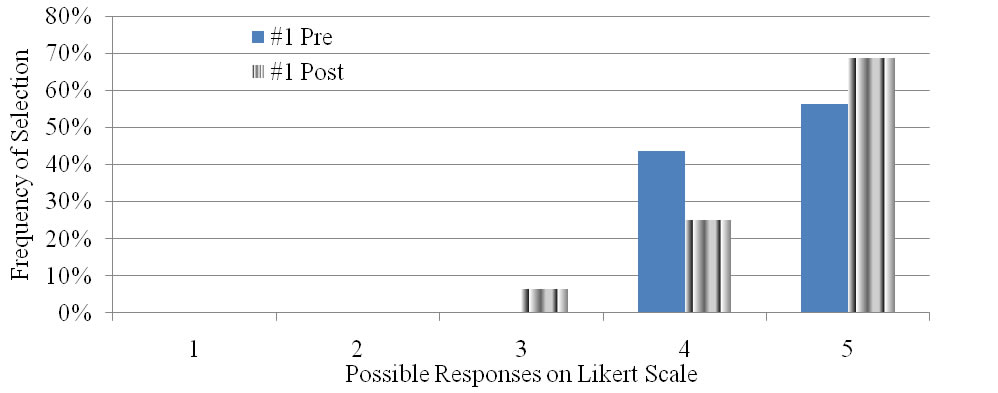
Figure 7. Distribution of responses to item 1, I use the computer to communicate with others, showing the strong computer use at the STEM school both before and following the Skype interviewing experience.
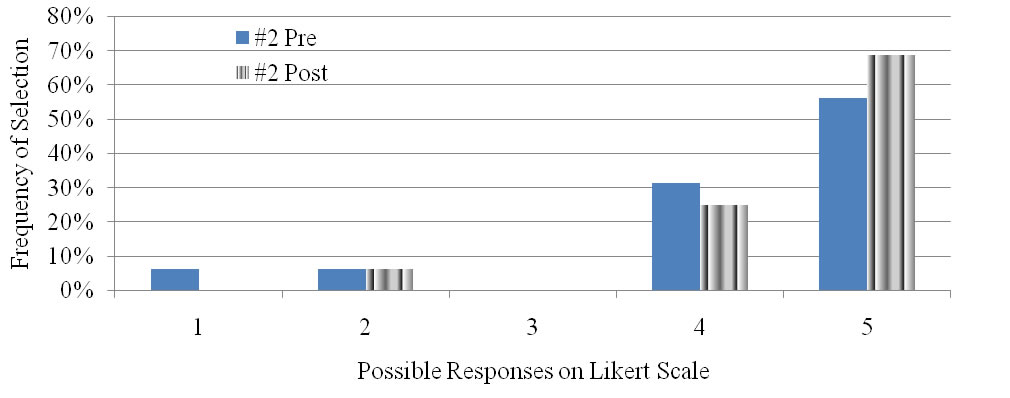
Figure 8. Distribution of responses to item 2, I use email to communicate with others, showing the strong use by the scholars at the STEM school of email both before and following the Skype interviewing experience.
While the scholars show themselves to be comfortable with the computer and regular users, their responses to item 3, shown in figure 9, demonstrate that there are limitations to their computer use. Their average responses to “I use FaceBook to communicate with others” were 3.06 in the per-survey and 3.13 in the post-survey, both very close to “No opinion or unknown.” Their lack of use of FaceBook may be due to their parents’ safety concerns and control of the use of the computer. This is an area that may warrant additional study.
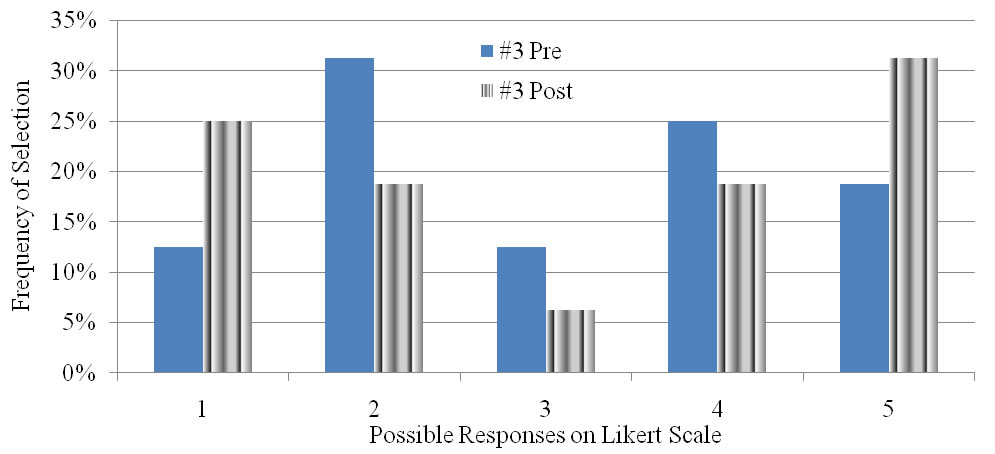
Figure 9. Distribution of responses to item 3, I use FaceBook to communicate with others, showing the ambivalence toward FaceBook use at the STEM school both before and following the Skype interviewing experience.
Narrative
When PC lessons were conducted at the test school in 2008 it was such a great experience for the scholars that many wanted to get in the class in 2009. The school PC lead teacher opted to have 16 scholars participate and selected the scholars. Fifteen additional scholars signed up on the waiting list. The 16 scholars were aware that there were many students that were ready to take their place if they did not perform in the sessions. One student was irresponsible and was replaced by another on the waiting list. He is shown on the data in table 2 as “Scholar withdrawn.”
The intent of this project was to implement technology to allow the scholars to obtain more and higher quality interviews. The test school, using Skype for the 2009-2010 school year, obtained 8 interviews and documented all 8 sufficiently for inclusion in their portfolio. These numbers compare to their achievements in the 2008-2009 school year of 2 interviews, with neither documented. The control school, for whom Skype was not available but whose students were taught face-to-face interviewing, achieved no interviews. These numbers indicate that through the use of Skype, the scholars obtained more and better quality interviews. Additionally, the scholars noted that two of their 8 interviews were conducted face-to-face. When some interviewees were unable to use Skype, the scholars arranged to interview them anyway. In 2008-2009 they could have interviewed teachers and did not, yet in 2009-2010 the scholars interviewed the same teachers using Skype between adjoining rooms. They were motivated to interview because they could use technology. One of the scholars commented, “I’m doing my work and having fun.”
The Skype interviews, both practice and real, were conducted using a laptop with projection on the wall so the entire class would remain engaged; all the scholars could observe the interview and take notes for the documentation. The scholars were prepared with 6 planning sessions. Session 1 was primarily to get rid of the “giggles,” as the students called the situation as they were practicing Skype interviewing peer to peer. The use of computers and the Internet to conduct a video-teleconference was a new and intriguing concept for many of the scholars, as shown in figure 10.

Figure 10. During the first two sessions scholars were excited to take their turn to Skype with their classmates and continued to be absorbed by seeing their faces on the computer monitor, developing a case of the “giggles” that took two sessions to cure (photos by students).
During break time the scholars could mingle and some of the other classes’ scholars would come by the door of the PC room. Because there were two computers configured with Skype, many of the PC scholars would continue to interview each other under teacher supervision even during break. Other classes’ scholars would ask, “What are you doing?” when they saw the students intently using the laptops with the cameras attached. The PC scholars would say, “Skyping!” The other class scholars said, “Wow, cool. Can I Skype?” Others were confused about what Skyping meant and when they saw their friends faces on the computer they wanted to learn about this type of interviewing. They came to the two teachers and ask how they could get in the class. The technology of Skype increased the students’ interest in participating in the program.
Session 2 involved a scholar-to-teacher interview where the scholars were warned to minimize the giggles and get used to seeing and hearing themselves on the computer. In session 3 scholars took turns Skype interviewing a teacher whom they had never met but who had come to help with their public policy problem. He also introduced them to netbooks and their use to Skype.
By session 4 scholars had conducted research on their public policy problem; some were more knowledgeable than others. In this session they used Skype to interview someone in Germany as shown in figure 11. The interviewer asked questions about issues associated with their public policy problem. The students were anxious to suggest questions. Many who were not the Skyper wanted to ask the German their own questions and in talking made noise during the interview. After the break scholars were warned that they could not continue the interruption of the interview even if they thought they had a good question that would improve the interview because any noise disrupted the interview.
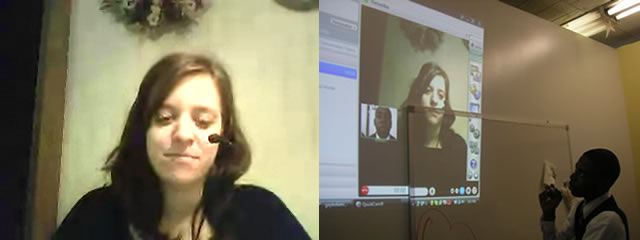
Figure 11. Scholars took a Skype image screen shot of the German interviewee and conducted the interview while the other scholars were watching the interview on the projection of the Skype interview. The other scholars were engaged in documenting the interview (photos by student and by author).
During the break time after the interview the PC scholars were telling other scholars and teachers that they were talking with someone in Germany. Also in this international Skype interview the scholars were able to get screen captures of items relevant to their project that the German national had in her home as shown in figure 12.

Figure 12. The scholars were asking about laws in Germany regarding recycling. The interviewee was in her home and spoke to her father in German to get the bottled waters that they recycle to show the scholars how they purchase the bottled water in cases and are charged 25 Euro cents deposit per bottle (photos by students).
In session 5 the scholars took turns doing Skype interviews of a contractor and later a government affairs specialist, both in America. During the time from the German interview to this session the scholars arranged that the one scholar at a time would walk up to the white board and write questions so the Skyping student could ask the interviewee better follow up questions. This worked out nicely, reduced noisy interruptions, and made for a better interview. After the session 5 interview when the Skype was off, the scholars showed excitement about the success of this invented method as shown in figure 13. One of the boys said, “I was the teleprompter.”
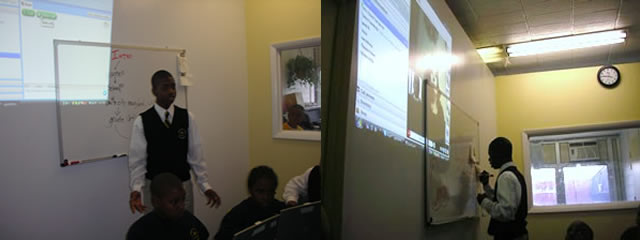
Figure 13. Scholar using the white board to enhance a Skype interview. While two other scholars were conducting the interview and providing technical assistance at the computer, this third student assisted at the white board. With the rest of the class watching the projected image and documenting the interview, this scholar with knowledge of the problem was at the board writing comments as the interview was progressing to prompt the interviewing scholar (photos by author).
Session 6 was to be a Skype interview with two local college community outreach specialists. The women were very excited about Skype but did not know how to use it. They asked if they could come to the school to learn about how to install and use Skype. The interest in Skype as a teleconferencing tool proved to be a technological skill that professionals have or desire on their computer and want training on using Skype. Some already have the Skype downloaded and are proficient and others want to get in on the technology.
One of the totally unexpected outcomes of this project was that the scholars would train professionals. During the 6th session the PC coordinator found online instructions on how to install Skype. The best found directions were http://www.youtube.com/watch?v=8jsW8MySSwU and http://www.youtube.com/watch?v=ssLj_89FHKI. Links to these two YouTube videos are at figure 14. Two scholars instructed the professionals using appendices C, D, and E, answered the professionals’ questions, and walked the professionals through the process. Lastly the scholars connected to an outside Skyper, an educator who promoted the use of Skype.Figure 14. Links to two YouTube videos with instructions to download and install Skype.
Recommendations
As recommended by Popham (2009), the next time this project is implemented the students will be allowed to remain anonymous in the pre- and post-surveys, allowing them to feel more freedom to be honest in their responses. Each variable will be addressed by multiple Likert statements and some of the addition questions will address the concepts from a negative perspective. Additionally, qualitative questions will be added, in the manner employed by Agbor-Baiyee (2009, p. 23), such as “What I liked about…” and “What was unclear was…”
Implementing Skype to any interview process provides a way for students to conduct meaningful interviews across great distances and without the expense or inconvenience of travel. This approach also invigorates the students, providing a motivating environment in which content areas can be taught using 21st Century concepts.
Other teachers implementing this project are encouraged to be very sensitive to cyber security for the students. As noted by Miller, Thompson, and Franz (2009), the cyber environment is constantly changing; new threats emerge frequently. Schools and teachers should continuously evaluate their Acceptable Use Policies (AUPs) to ensure they continue to guarantee cyber safety for their students. For example, Skype currently does not display external advertisements, a potential source of inappropriate or malicious links (Miller et al., 2009), but it might in the future. Teachers should consider the current cyber environment in which their students operate.
Future implementations of this project should also be sensitive to continuous improvement using both quantitative information from evidence-based practice (EBP) and qualitative information from anecdotal sources. Both have value in evaluating an effort (Kovarsky, 2008). Anecdotal information can be obtained through the survey instruments, such as appendices A and B, and through paying attention to the verbal remarks of the students, both solicited and non-solicited. The students’ anecdotal responses to the pre- and post-survey instruments at the test school and the survey at the control school are at appendices G and H respectively.
The use of laptops to Skype and take notes is highly recommended. Arranging the room more like a news room than a classroom worked well so the scholars were encouraged to work together. It brings the atmosphere of a more professional appearance and engages the students in a way to act as professionals. It may also be beneficial to have the scholars do work on a table or move the desks together to make a group of desks as a working area When one of the teachers walked in the room and saw the intently working scholars she said, “This looks like the CNN or FOX news room.” This set up is displayed in figure 15.
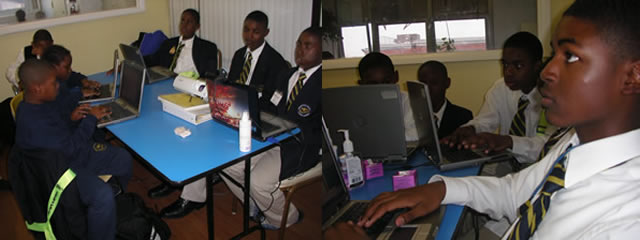
Figure 15. Scholars set up as a group in the classroom to conduct an interview and write the documentation of the interview. Scholars watch the projection and listen to the interview to get interview documentation to share and compile the best information for their PC portfolio (photos by author).
Conclusion
This final project using Skype to acquire and conduct interviews for Project Citizen students became quite an enjoyable project for the students, staff, and community leaders. The use of Skype improved the instructional outcome of interviews, both when using Skype and when face-to-face. The students quickly caught on to the use of Skype and began looking for applicable people to get quality interviews. They were motivated to find interviews and in some cases the professionals did not use Skype but would give a phone interview or even in one case the professionals wanted to come to the school to see what this Skype was all about. They gave the students face-to-face interviews and the students prepared and presented a Skype training session to the professionals. Technology brought the professionals to the classroom and provided the students an opportunity to make a training presentation to professionals. The bottom line goal was for the students to get more and better quality interviews for their PC Portfolios. The students learned about interviews, got information for their portfolios, set the stage for a VoIP, and learned appropriate technique performing Skype interviews.
Bringing PC, Skype, and interviewing together is a natural combination for success. They complement each other. PC is a very student interactive project, Skype is simple and a new technology that the scholars are interesting in learning more about and interviewing brings people together which is so desirable for middle school students. At a school where the students, teachers, and administration were prepared and supportive, the technology enabled the students to achieve a higher level of success in PC and its associated content areas.
References
Agbor-Baiyee, W. (2009, Mar). Orienting student using a case-based instructional approach: A case study. Journal of Instructional Psychology, 36(1), 20-28. Retrieved November 24, 2009 from EBSCOhost.
Kovarsky, Dana. (2008, May-June). Representing voices from the life-world in evidence-based practice. International Journal of Language & Communication Disorders, 43(S1), 47-57. Retrieved November 24, 2009 from EBSCOhost.
Miller, Nicole C., Thompson, Nicole L., & Franz, Dana Pomykal. (2009, September). Proactive strategies to safeguard young adolescents in the cyberage. Middle School Journal. Retrieved November 24, 2009 from EBSCOhost.
Pophan, W. James. (2009, May). Assessing student affect. Educational Leadership. Retrieved November 24, 2009 from EBSCOhost.

|
Appendix A - Handout-Pre Project Citizen Interview Survey.docx Size : 0.015 Kb Type : docx |
|
|
Appendix B - Handout-Post Project Citizen Interview Survey.docx Size : 0.015 Kb Type : docx |
|
|
Appendix C - Handout-Skype Interview Planning Checklist.docx Size : 0.012 Kb Type : docx |
|
|
Appendix D - Handout-Project Citizen Skype Interview Script.docx Size : 0.012 Kb Type : docx |
|
|
Appendix E - Handout-Skype voice over Internet protocol connecting checklist.docx Size : 0.012 Kb Type : docx |
|
|
Appendix F - Handout-Student Productivity.docx Size : 0.013 Kb Type : docx |
|
|
Appendix G -STEM School Student Responses to a Solicited Open-Ended Question.docx Size : 0.014 Kb Type : docx |
|
|
Appendix H - Control School Student Responses to a Solicited Open Ended Question.docx Size : 0.011 Kb Type : docx |

Webmaster: Gayle Dietrich, gayledietrich@comcast.net. Last modified November 29, 2009.
